
 Print
Print
|
|
|
|



Search
The Search tab allows you to search the database by part program, sensor, inspection, inspection type, date, time, and machine part.
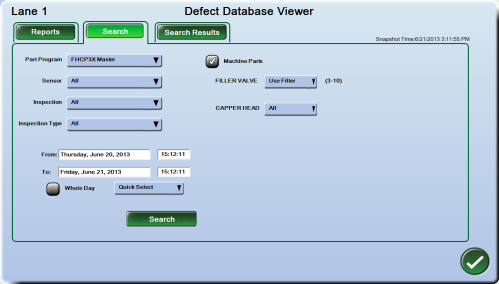
To start the search:
- Choose the desired filters from the available options.
- Click the Search button. The search may take a few seconds depending on the search criterion and the size of the database. Afterwards, the Search Results tab is automatically selected.
If your system uses machine parts, you have the option of searching for defects by machine part.
To search by Machine Part:
- Check the box next to "Machine Parts" to enable the search filters.
- If you want to search by all machine parts, leave the drop-down menu at "All."
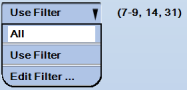
- To select specific machine parts, select "Use Filter" in the drop-down menu. The Select Machine Parts screen is displayed.
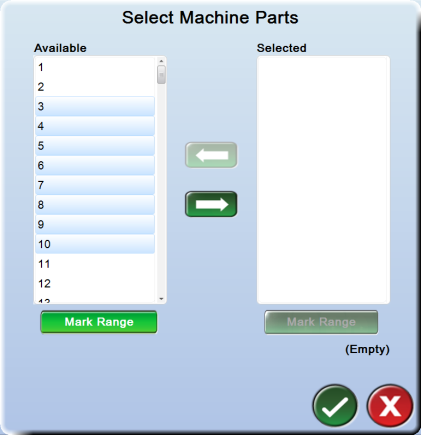
- Select a machine part number in the "Available" column. Click the right arrow button to move that machine part number to the "Selected" column.
- To select additional machine parts, select each machine part, then click the right arrow button to move each into the "Selected" column.
- To select contiguously listed machine parts, select the first desired machine part, then click the Mark Range button. Select the last listed machine part you want to search for. The system selects all machine parts between the first and last machine part you selected. Click the right arrow button to move all those machine parts to the "Selected" column.
- To de-select any machine part, highlight it in the "Selected" column, then click the left arrow button to move it to the "Available" column. Use the Mark Range feature to select a group of contiguously listed machine parts.
- All selected machine parts are listed below the "Selected" column. Click the OK button to save changes and exit. The selected machine parts are also displayed in the Defect Database Viewer Search screen.
- In the Defect Database Viewer Search tab, an "Edit Filter" option is added to the drop-down menu. You can change the list of machine parts to search using the "Edit Filter" option.
Print
|
Published: 7/30/2013 3:24:08 PM ©2015 ACME Ltd. All rights reserved. |
 |